When you create a new pipeline component, there are a number of options available to you: you could write it completely from scratch, or you could simply use Martijn Hoogendoorn’s Pipeline Component Wizard, which can save you heaps of time.The Pipeline Component Wizard can be downloaded from the following link:
http://www.codeplex.com/btsplcw/Release/ProjectReleases.aspx?ReleaseId=2248
This tool can be run to gain a consolidated view of orchestration tracking data for a specified period of time to help developers get an idea of how their orchestrations are being processed and how much coverage they are getting in their testing. In addition to simple coverage information the data presented helps to identify latency and code path exceptions by highlighting long running and error prone orchestration shapes which is key to effective performance testing......
Have a look here for a complete description.
You can download this amazing tool from here
The purpose of this article is to share those useful tips with you , you can find it here : http://msdn.microsoft.com/msdnmag/issues/07/05/BizTalk/default.aspx
There is a helpful tool which examines the BizTalk Server 2006 deployment and generates a list of issues pertaining to best practices standards for BizTalk Server deployments this tool called "BizTalk Server 2006 Best Practices Analyzer" you can download from here: http://www.microsoft.com/downloads/details.aspx?FamilyID=dda047e3-408e-48ba-83f9-f397226cd6d4&displaylang=en
A very important topic I will talk about which is how to develop a custom functoid. Especially Developing a Custom Referenced Functoid.
A Custom Referenced Functoid!!! You mean there are other types of custom functoid.
Yes, there are three types. Let us define them
A Custom Referenced Functoid: Custom referenced functoids do not copy implementation code inline into the map. Instead, a reference to the assembly, class, and method is placed in the extension object file associated with the generated style sheet and called at run time.
A Custom Inline Functoid: Custom inline functoids provide functionality by copying implementation code directly into a map and not by referencing an assembly, class, and method name like a custom referenced functoid.
A Custom Cumulative Functoid: Use a custom cumulative functoid to perform accumulation operations for values that occur multiple times within an instance message.
Now after you knowing what the types of Custom Functoids are, let us develop our custom referenced functoid.
Note #1: all custom functoids must derive from the BaseFunctoid class. You must first override the constructor and make a set of calls that tell BizTalk Mapper about your custom functoid. Then you need to write the functoid logic
Fine, our custom functoid name Percentage, which will calculate the percentage where it takes two input parameters.
1) Fine, create a new project its type is class library and name it CustomFunctoid
2) Add a reference of Microsoft.BizTalk.BaseFunctoids you can find it here :
X:\Program Files\Microsoft BizTalk Server 2006\Developer Tools\Microsoft.BizTalk.BaseFunctoids.dll (where X the drive that holds the installation of BizTalk server 2006)
3) let you class implement from BaseFunctoid
public class Percentage : BaseFunctoid
4) let the constructor override the base
public Percentage(): base()
5) write the following line of code in the construction :
this.ID = 3003;
SetupResourceAssembl("CustomFunctoid.CustomFunctoidResource", System.Reflection.Assembly.GetExecutingAssembly());
SetName("PERCENTAGE_NAME");
SetTooltip("PERCENTAGE_TOOLTIP");
SetDescription("PERCENTAGE_DESCRIPTION");
SetBitmap("PERCENTAGE_BITMAP");
this.SetMinParams(2);
this.SetMaxParams(2);
SetExternalFunctionName(GetType().Assembly.FullName, "CustomFunctoid.Percentage", "CalculatePercentage");
this.Category = FunctoidCategory.Math;
AddInputConnectionType(ConnectionType.AllExceptRecord);
this.OutputConnectionType = ConnectionType.AllExceptRecord;
Where:
· ID: Assign a unique ID to the functoid
· SetupResourceAssembly: Point to the resource assembly
NOTE #2: Include a resource file with your project. If building with Visual Studio, the resource assembly must be ProjectName.ResourceName. Example: Our resource file named CustomFunctoidResource which includes the value of name, tooltip , description, and the Icon of our custom Functoid , and our project named CustomFunctoid
· SetName , SetTooltip , SetDescription, SetBitmap: set the name , tooltip , description and the icon of our custom functoid
· SetMinParams, SetMaxParams: Specify the number of parameters accepted , where SetMinParams is used to set the number of required parameters and the SetMaxParams is used to method to set the number of optional parameters
· SetExternalFunctionName: Tell BizTalk Server which methods to invoke for your functoid
· Category: Assign the functoid to one or more categories, for example Math, String, MassCopy…etc.
· AddInputConnectionType : Declare what can connect to your functoid
· OutputConnectionType : Declare what your functoid can connect to
6)Now create the function that will calculate the percentage which is :
public float CalculatePercentage(float x, float y)
{
float c = float.MinValue;
c = (x / y) * 100;
return c;
}
7) Create a Strong key , and Assign it to your class library
8) Build the Class Library and copy the DLL to : X:\Program Files\Microsoft BizTalk Server 2006\Developer Tools\Mapper Extensions (where X is the drive that holds the installation of BizTalk Server 2006)
9) Add this dll it to the GAC ( open the Visual Studio 2005 Command Prompt and type GACUTIL –i X:\CustomFunctoid.dll)
10) Add it to the ToolBox in Visual Studio 2005 (right click on the ToolBox, choose Add/Remove items, click the Functoids tab and browse to the Customfunctoid.dll file and make sure it’s checked.
you can download the whole project from here
New transaction cannot enlist in the specified transaction coordinator
machine the OS of it is Windows 2003 SP1, and the O.S. of the
machine that am trying to generating the schemas from is Windows XP SP2 , so
I had tried the following solutions and nothing happen
- I had manipulate the communication settings on both of the BizTalk machine and the SQL machine using the instructions this article :
i. http://msdn2.microsoft.com/en-us/library/ms679479.aspx - In addition, I had added MSDTC into the exception list in the Windows Firewall settings. using the following steps:
1. In Control Panel, open Windows Firewall.
2. Click the Exceptions tab, and then click Add Program.
3. Click Browse, and then add c:\windows\system32\msdtc.exe.
4. In Programs and Services, select the Msdtc.exe check box, and then click OK. - I had turned off RPC security , using the following steps :
1. Start Registry Editor (Regedt32.exe).
2. Locate the following key in the registry: HKEY_LOCAL_MACHINE\SOFTWARE\Microsoft\MSDTC
3. On the Edit menu, click Add Value, and then add the following registry value:
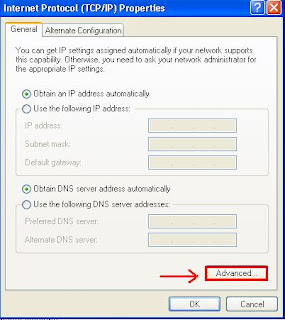
Finally, AfterI had researched for a long time within the blogs , I found that you should Enable NetBIOS on your network adapter taking the following steps:
- Start => Control panel => Network Connections
- Open Properties for the you network connection
- TCP/IP Properties
- Advanced and select WINS Tab
- Ensure that the "Enable NetBIOS over TCP/IP" is selected
In the last article , you can find it here. I had given a very simple view about WCF and the benefits that will give it to us , in this article I will talk about WCF adapter of BizTalk 2006 R2; imagine the benefits of WCF with BizTalk . :))
There is a video by Steven W. Thomas called "BizTalk 2006 R2 WCF Adapter First Look Video"; it was a very good and very simple video.You can watch this video from here
But I would like to mention important things, What Is the WCF-BasicHttp Adapter? And Why the WCF-BasicHttp adapter is preferred than the SOAP adapter?
WCF-basicHttp means you can do cross-computer communication with legacy ASMX-based Web services and clients that conform to the WS-I Basic Profile 1.1, using either the HTTP or HTTPS transport with text encoding. However, you will not be able to take advantage of features that are supported by WS-* protocols.
What is the problem of that, I can do it using the SOAP adapter!!!!
You are totally right but check the following:
- WCF adapters documents per second rate is general be better than SOAP adapter.
- SOAP adapter has the disadvantage of serializing and deserializing messages between .NET types and raw XML data which in some cases could result in unwanted data modification. WCF adapters take the approach of preserving the data stream.
- WCF adapters publish what is essentially the same schema as will be used in the BizTalk runtime. In contrast, SOAP adapter returns metadata generated by reflecting on the .NET classes generated to represent the schemas. Since .NET does not preserve all the nuances of XSD schemas, the exposed WSDL may not accurately reflect the schemas used by the BizTalk runtime.
- It is easier to migrate from WCF-BasicHttp to WCF-WSHttp if needed.
Amazing right, enjoy… :))